
The list your patient brings
Pilora is an app people use to keep track of their supplements and medications. Before a visit they can print one page called "What I take". This page explains what is on it, how it is made and what it cannot tell you.
What is on the list
- Medications and supplements in separate tables, with prescription and over-the-counter marked
- For each item, the ingredients and the amount per serving as printed on the label
- How the patient takes it: the amount and the times they set in the app
- "Combinations to review": pairs of items on the list that match a reviewed interaction, most serious first, each with its source
- The patient's name and date of birth as they entered them, and the date the list was made
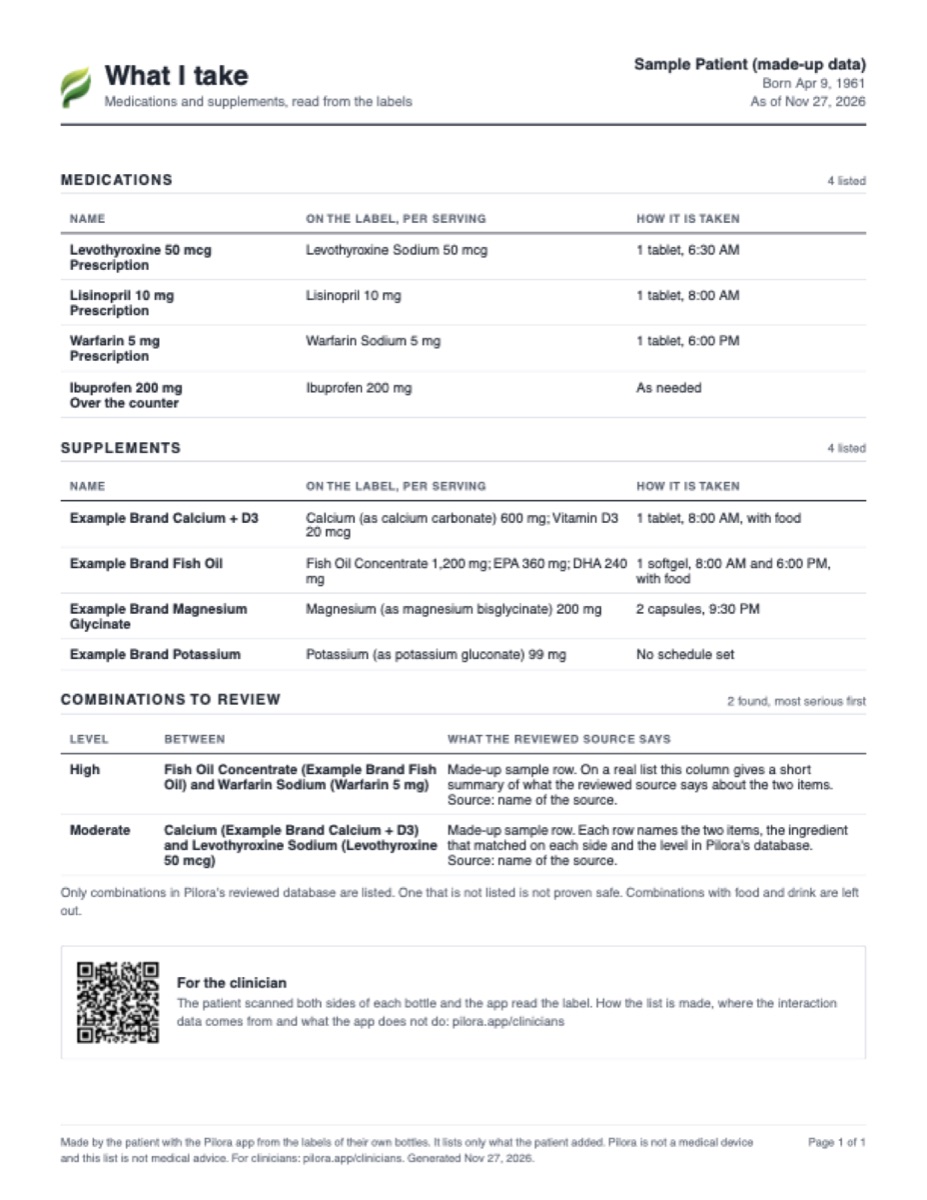 Open the sample (PDF, made-up data)
How it is made
The patient photographs both sides of each bottle and the app reads the label. The app does not let people add a product by typing its name, so the rows come from containers the patient had in hand. The patient checks the result and sets when they take each item. The app is free for up to 5 items; Pro is $4.99 a month and Family is $9.99 a month.
Where the interaction data comes from
Pilora keeps its own database of reviewed interactions (639 have a public article). Every entry names its source, such as an FDA drug label on DailyMed or a published study, and the same entries are open to read on the interactions pages. How entries are chosen and graded is on the methodology page. You can try the same check without an account in the free checker.
What the list cannot tell you
- It contains only what the patient scanned. A product they never added is not on it.
- A combination that is not listed is not proven safe. Only pairs in the reviewed database are shown.
- The label was read by software from a photo. A misread is possible, so confirm anything that matters.
- The times and amounts are what the patient set, not what was prescribed.
- Pilora is not a medical device. It does not diagnose, and it never tells a patient to start, stop or change a medicine or a dose.
What you need to do
Nothing. There is no account for you to create, nothing to install and no system to connect. Pilora does not send anything to you, to a pharmacy or to a medical record: the patient shows or hands you the page themselves.
Pharmacists
Your record shows what was filled at your pharmacy. The list adds what it cannot see: supplements bought elsewhere, over-the-counter products and prescriptions filled at another pharmacy, as long as the patient scanned them. It gives you a starting point for a medication review, with the ingredient and amount of every item.
Dietitians and nutritionists
Product names tell you little. The list shows what is inside each product: every ingredient and the amount per serving as printed on the label, including multi-ingredient formulas and blends. You can see at a glance where the same nutrient comes from several bottles.
Nurses, medical assistants and doctors
At intake, the patient hands over one page instead of reciting from memory. Medications and supplements are listed separately, each with its amount and the times the patient set. You still confirm it with the patient, as you would any list they bring.
About the handouts
Each handout is one Letter page that tells patients how to make their list before a visit. Print it at full size. You are welcome to use it as it is. The code on it opens the app's download page.
How Pilora earns money
From paid plans in the app, and from supplement orders that users place in the app through Fullscript. Pilora does not sell personal information, and the app shows no ads. More about the company on the about page.
Tell us what would make the list more useful
If something on the list is unclear, wrong or missing for your work, write to hello@pilora.app. To report an interaction entry you disagree with, the methodology page explains how.